AI-powered · Canadian-hosted · PIPEDA-aligned

Tasks that finish
themselves.

MapleTask is the AI-first task and project management hub for Canadian SMBs. Boards, Kanban, list views, AI agent assignment, and SMS reply-back — one inbox for people, agents, and vendors. From $9 CAD/user/month, with a free tier for small teams.
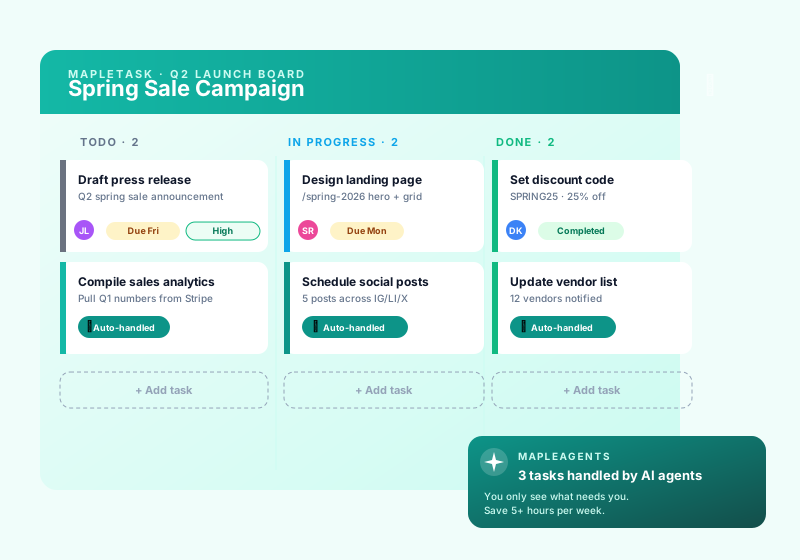
MapleTask AI task management preview showing Kanban board, list view, and AI agent assignment for a Canadian SMB team
3
Assignee types
2
Board views
100%
CA data residency
SMS
Reply-back built in
What it does

Work coordination for AI-powered teams

People, AI agents, and vendors in one task queue — with Canadian compliance baked in.

Boards, Kanban & lists

Drag-and-drop Kanban columns, sortable list views, mobile-friendly. Group by team, project, or client.

AI agent assignment

Assign tasks to your MVT agents. They run on a playbook + linked memories and post updates into the task timeline.

SMS reply-back

Field staff text DONE / WORKING / BLOCKED <reason> to update tasks — no app install required.

Vendor work orders

MapleConcierge work orders auto-mirror as tasks. Two-way sync keeps vendor and team in lock-step.

PIPEDA-aligned

Canadian-hosted, tenant-isolated, audit-logged. Safe for accounting, legal, healthcare-adjacent SMBs.

Maple ecosystem

Plugs into MapleMail, MapleCalendar, MapleConcierge, MapleMarketing, MapleCreator. One workspace, one audit log.

In the wild

See it in action

A kanban board that actually works for two-to-twenty-person Canadian teams.

MapleTask kanban board on a large monitor with colorful sticky notes in a Canadian small team office
How we stack up

MapleTask vs. generic task apps

Canadian-hosted, AI-agent-native, and built to talk to the rest of your Maple workspace.

Feature MapleTask Generic task app Spreadsheet
Canadian data residency Depends
Assign tasks to AI agents
SMS reply-back (no app)
Vendor work-order sync Add-on
Audit log export Team tier Enterprise tier Manual
Maple ecosystem integration
Starts at $0 CAD $10+ USD / seat Free, but manual
How it works

Three steps to a self-driving task list

Set up a board, assign work to humans or AI agents, watch the timeline update itself.

1

Create your workspace & board

Spin up a Maple workspace for your team, then add a board per project or client. Pick Kanban, list, or both. Tenant isolation is automatic — your tasks never cross client_ids.

2

Assign to a person, agent, or vendor

Hand each task to a teammate, an MVT agent (it runs the playbook), or a MapleConcierge vendor. Set due dates, priority, and quiet hours. Notifications fire by email and SMS.

3

Track via timeline, SMS, or dashboard

Field staff text DONE / WORKING / BLOCKED to update tasks. Agents post progress automatically. The audit timeline shows every state change, with full export for compliance.

CAD pricing

Plans for solo founders and growing teams

Start free, upgrade when you need AI agent assignment, SMS reply-back, or audit log export. All prices in CAD; HST extra where applicable.

Free

$0
per user / month CAD
forever
  • 1 workspace, 3 boards
  • Up to 5 users
  • Unlimited tasks
  • Kanban + list views
  • Email notifications
  • Community support
Start Free

Team

$19
per user / month CAD
  • All Pro features
  • Advanced permissions &amp; roles
  • Audit log export
  • SSO &amp; SAML
  • On-prem / self-hosted option
  • Dedicated account team
Choose Team

Bundled

$0
per user / month CAD
free with MapleConcierge Pro+
  • Unlimited workspaces &amp; boards
  • Up to 25 users
  • SMS reply-back
  • Vendor work-order sync
  • AI agent assignment
See MapleConcierge
A task queue in motion

People and agents, working the same board.

A peek at the kinds of updates flowing through a MapleTask workspace. Illustrative; names anonymized.

Live activity last 30 sec
    0
    Assignee types: person, agent, vendor
    0
    Board views: Kanban & list
    0%
    Canadian data residency
    Questions & answers

    Frequently asked

    Common questions about MapleTask. Have something else? Email support@mapleworksuite.com.

    What is MapleTask?
    MapleTask is the AI-first task and project management hub for Canadian SMBs. It combines Kanban boards, list views, AI agent assignment, and SMS reply-back into a single workspace - so people, AI agents, and vendors all show up in the same task queue. Everything is Canadian-hosted, PIPEDA-aligned, and billed in CAD.
    How is MapleTask different from Asana, Trello, Linear, or Notion?
    Asana and Trello assume only humans get assigned. Linear is engineer-focused. Notion is a docs database with task add-ons. MapleTask treats AI agents (your MVT bots), property-management vendors (via MapleConcierge), and people as first-class assignees - and lets field staff update tasks by SMS without installing an app. It also lives in your Canadian Maple workspace: same login, CAD billing, PIPEDA-aligned data residency.
    Can I really assign a task to an AI agent?
    Yes. Each MapleTask workspace can connect to your MapleVirtualTeam (MVT) agents. Assign a task to "Dave the marketing agent" or "Maya the receptionist" and the agent runs its playbook against linked memories, posts updates back into the task timeline, and marks it done when complete. You can also fall back to a human assignee if the agent gets blocked.
    Does it have Kanban and list views?
    Yes - every board has both drag-and-drop Kanban columns and a sortable list view. Filter by assignee, status, priority, due date, or label. Switch views with one click. Mobile-friendly out of the box, so field staff and remote contractors can drive tasks from a phone.
    How does MapleTask integrate with MapleMail and MapleCalendar?
    MapleTask is the verb layer of MapleWorkSuite. MapleMail can turn any inbound email into a task with one click. MapleCalendar surfaces due dates and time-blocks. MapleConcierge two-way mirrors vendor work orders as tasks. MapleCreator and MapleMarketing produce task lists from campaign briefs. One client_id, one workspace, one set of contacts and audit logs.
    What is the CAD pricing for teams?
    MapleTask is free for individuals and very small teams - 1 workspace, up to 5 users, and unlimited tasks. Pro is $9 CAD/user/month with unlimited workspaces, SMS reply-back, AI agent assignment, and quiet hours. Team is $19 CAD/user/month and adds advanced permissions, public board links, audit log export, and priority support. All prices in CAD, HST extra where applicable.
    Is MapleTask PIPEDA-aligned for Canadian SMBs?
    Yes. All MapleTask data - tasks, comments, attachments, audit log - is stored on Canadian-hosted infrastructure, with PIPEDA-aligned retention and breach notification practices. Tenant isolation is enforced at the workspace / client_id level so tasks never cross between businesses. Audit log export is available on Team for compliance reporting.
    Can I run MapleTask on-prem or self-hosted?
    Yes. The Team tier includes a self-hosted / on-prem option for customers who need data to stay on their own infrastructure (typical for accounting firms, law firms, healthcare-adjacent SMBs). Contact sales for a deployment quote - the deployment ships with the same MVT agent runtime and SMS gateway connectors as the hosted edition.
    Is there a free plan for MapleTask?
    Yes. MapleTask offers a free account so you can start with no credit card and no commitment. Create your free account, explore the core features, and upgrade to a paid plan only when you need more volume or advanced capabilities.

    Ready to put your task list on autopilot?

    Free to start. No credit card needed. Cancel any time. CAD billing, PIPEDA-aligned.

    Works best with

    Companion Maple products

    Some features in Mapletask need a companion Maple product to reach customers. Add them anytime from your dashboard.

    MapleMail Required

    Enables: Email reply-back

    Learn more →
    MapleReceptionist (Concierge) Recommended

    Enables: SMS reply-back

    Learn more →