Canadian-hosted · PIPEDA aligned

AI website chat that follows
your playbook.

MapleChat is an AI-first website chat widget for Canadian small businesses — build unlimited chatbots, free. No tiers, no monthly fees, no per-site or per-agent charges. Author a playbook in plain English — greetings, guardrails, MCP tool calls, human handoff — and the widget goes live on any website in minutes. You only pay for the Maple AI Tokens you actually use (1 token is about 4 characters): chatting, image and video generation, and voice-AI. No usage, no cost. PIPEDA-aligned, hosted in Canada, never trains on your conversations.
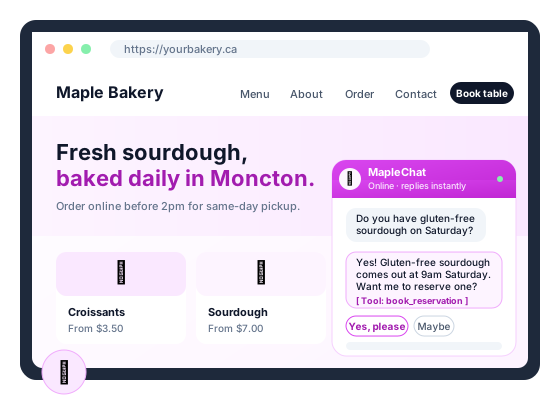
MapleChat chat bubble overlay on a small business website
$0
To build unlimited chatbots
15 min
Average install time
100% CA
Data residency
24/7
AI on-call
What's inside

Everything an AI chat widget should do — and nothing it shouldn't

MapleChat is built for Canadian SMBs that want a chat widget visitors actually trust. You author the playbook. The bot stays in scope or escalates.

Playbook-driven

Write greetings, guardrails, escalation rules, and tone in plain English. Changes go live the moment you save.

MCP tools

The AI can book appointments via MapleCalendar, file tickets in MapleDesk, look up invoices, or call your own webhook.

Smart human handoff

When the bot detects frustration, sensitive topics, or an explicit ask, it hands off — with full context — to your team via MapleDesk, email, or Slack.

Domain-locked embeds

Lock the widget to the exact domains you own so nobody else can reuse your script tag or burn your AI quota.

Canadian-hosted & PIPEDA-aligned

Conversations stay in your tenant on Canadian infrastructure. We don't pool tenant data for training, ever.

One-click install on MapleWeb

If you build your site on MapleWeb, the Studio Chat Setup wizard installs MapleChat in three clicks. Anywhere else, paste one script tag.

In the wild

See it in action

Live chat with AI assist that knows your Canadian customer base.

MapleChat live chat conversation interface on a monitor in a Canadian customer service workspace with warm lighting
How we compare

MapleChat vs Intercom vs Drift vs Tidio

Most chat platforms charge per agent or per month. MapleChat has no tiers and no monthly fees — you only pay for the AI tokens you use.

Feature MapleChat Intercom Drift Tidio
Pricing model (CAD) Pay-as-you-go tokens ~$99 / agent / mo ~$2,500 / mo enterprise ~$39 / site / mo
Author playbook directly Yes — plain English Train a model Train a model Flow builder
MCP tool calls Custom build Custom build
Canadian data residency US / EU US EU / US
Domain lock on embed
No training on your data Opt-out Opt-out Opt-out

Competitor pricing approximate, public list prices as of May 2026.

One agent, every channel

Integrates with the Maple suite

MapleChat is the text-chat layer. The same MVT agent — Dave, Zara, or your own — handles every visitor touchpoint across the suite.

MapleWeb

Every Maple-built site ships with a MapleChat widget by default — no script tag, no setup. Studio Chat Setup gets it live in three clicks.

MapleConcierge

Tenant portals get the MapleChat widget baked in so residents can ask questions, file maintenance requests, and check their balance without picking up the phone.

MapleReceptionist

Voice AI for inbound phone calls. Every Receptionist plan includes a MapleChat widget for text-based follow-up so the same conversation continues across phone and web.

MapleVoice

Voice inside the MapleChat widget. Visitors tap the mic and talk to the same MVT agent instead of typing. Requires an active MapleChat plan to attach to.

Pricing

No tiers. No monthly fees. You only pay for tokens.

Build unlimited chatbots, free. You only pay for the Maple AI Tokens you use — chatting, image and video generation, and voice-AI. No usage, no cost.

Chatting

Every message your AI sends or receives uses tokens. Text chat is the lightest use — 1 Maple AI Token is about 4 characters.

Image & video generation

Generating images and videos with AI uses more tokens than text chat — heavier output, heavier draw on your balance.

Voice-AI

Speaking with the AI is the most token-intensive use of all. Talk only when you want to — silence costs nothing.

Buy tokens as pay-as-you-go packs. Packs roll over and never expire — prices in CAD.

50K tokens

$5
CAD one-time
  • 50,000 Maple AI Tokens
  • Pay-as-you-go — no subscription
  • Rolls over, never expires
Buy tokens

250K tokens

$19
CAD one-time
  • 250,000 Maple AI Tokens
  • Pay-as-you-go — no subscription
  • Rolls over, never expires
Buy tokens

1M tokens

$59
CAD one-time
  • 1,000,000 Maple AI Tokens
  • Pay-as-you-go — no subscription
  • Rolls over, never expires
Buy tokens

5M tokens

$199
CAD one-time
  • 5,000,000 Maple AI Tokens
  • Pay-as-you-go — no subscription
  • Rolls over, never expires
Buy tokens
Build unlimited chatbots, free. You can have 100 chatbots — if they never chat, it costs you $0. The only cost is the Maple AI Tokens you use. 1 Maple AI Token ≈ 4 characters. Hosted in Canada, PIPEDA-aligned, never trained on your conversations.
Questions & answers

Frequently asked questions

Common questions about MapleChat. Have something else? Email support@mapleworksuite.com.

What is MapleChat?
MapleChat is an AI-powered website chat widget that answers visitor questions on your site. Unlike generic chatbots, it is trained on a playbook you control — you decide how it greets people, what it knows, when it hands off to a human, and what it must never say. Build unlimited chatbots free, with no tiers and no monthly fees; you only pay for the Maple AI Tokens you use, and it is hosted entirely in Canada.
How is MapleChat different from Intercom, Drift, or Tidio?
Intercom and Drift are primarily human-staffed chat platforms with AI bolted on, billed per agent per month. Tidio is cheaper but its AI is generic. MapleChat is AI-first with optional human handoff, has no tiers and no monthly fees, and you only pay for the Maple AI Tokens you use — build as many chatbots as you like for free. You author the playbook directly instead of training a model.
Does MapleChat have AI agents that can take actions?
Yes. MapleChat supports MCP tools so the AI can book appointments via MapleCalendar, create tickets in MapleDesk, look up invoices in MapleInvoice, search FAQs, or call any custom webhook. The playbook decides when each tool fires.
Is MapleChat Canadian-hosted and PIPEDA aligned?
Yes. All chat data — transcripts, visitor metadata, playbooks — is stored on Canadian infrastructure in the same secure region as the rest of MapleWorkSuite. We do not pool tenant data for model training and we do not share conversations with model vendors beyond the API call required to answer the visitor.
How does MapleChat integrate with MapleMail, MapleTask, and MapleContacts?
Out of the box. New leads flow into MapleContacts, escalations create MapleTask cards or MapleDesk tickets, and transcript summaries can be emailed via MapleMail. One login, one CAD bill, no Zapier middleware.
What does MapleChat cost in Canadian dollars?
MapleChat has no tiers and no monthly fees. Building chatbots is free — you can run as many as you want, and if they never chat it costs you $0. The only cost is the Maple AI Tokens your usage consumes: chatting (lightest), image and video generation (more), and voice-AI (most). You buy tokens as pay-as-you-go packs in CAD — 50,000 for $5, 250,000 for $19, 1,000,000 for $59, or 5,000,000 for $199 — and they roll over and never expire. 1 Maple AI Token is about 4 characters. No usage, no cost.
How is MapleChat different from MapleReceptionist and MapleVoice?
MapleChat is the AI text-chat widget that sits on your website. MapleReceptionist is the AI voice receptionist that answers your inbound phone calls — it includes a MapleChat widget for text-based follow-up. MapleVoice is the voice layer for MapleChat — it lets your visitors talk to the same MVT agent inside the chat widget instead of typing. To use MapleVoice you need an active MapleChat plan it can attach to. The same MVT agent (Dave, Zara, etc.) handles all three channels seamlessly.
Can MapleChat run on non-MapleWeb websites — WordPress, Wix, Squarespace, Shopify?
Yes. Anywhere you can paste a script tag, MapleChat will run — WordPress, Wix, Squarespace, custom code, Shopify, even static HTML. MapleWeb just gives you one-click install from the Studio Chat Setup wizard.
Does MapleChat have mobile and desktop apps for my team?
Yes. The MapleWorkSuite operator app — web, iOS, Android, macOS, Windows — handles human handoff. When the AI escalates, the next available teammate gets a push notification with the full conversation context and can reply from any device.
What is MapleChat used for?
MapleChat is used to answer visitor questions on Canadian small-business websites without staffing a chat team. It greets visitors, answers FAQs, books appointments via MapleCalendar, files support tickets in MapleDesk, escalates to a human when needed, and stays inside a playbook you author in plain English. Common uses: pre-sales questions, hours and pricing lookups, appointment booking, lead capture, and tenant portals for property managers.
Is there a self-hosted version of MapleChat for small businesses?
MapleChat itself is delivered as a Canadian-hosted SaaS — there is no separate self-hosted binary today. That said, every plan is single-tenant on Canadian infrastructure (Moncton region) and you keep ownership of the playbook, transcripts, and visitor data. For small businesses that need on-prem AI, MapleChat can call out to a webhook in your network via MCP tools, so sensitive lookups happen on your servers while the chat UI stays managed by MapleWorkSuite.
Is there a free plan for MapleChat?
Yes. MapleChat offers a free account so you can start with no credit card and no commitment. Create your free account, explore the core features, and upgrade to a paid plan only when you need more volume or advanced capabilities.

Spin up an AI chat that actually understands your business

Free to build. One script tag. Three clicks on MapleWeb. PIPEDA-aligned — you only pay for the tokens you use.

Works best with

Companion Maple products

Some features in Maplechat need a companion Maple product to reach customers. Add them anytime from your dashboard.

MapleVoice Required

Enables: Voice mode in chat widget

Learn more →