No-code automation · Canadian-hosted

MapleWorkflow — no-code automation,
native to your tenant.

No-code workflow automation across the Maple suite. Drag triggers, drop actions, ship in minutes — like n8n or Zapier, but native to your tenant. Canadian-hosted, PIPEDA-aligned, billed in CAD.

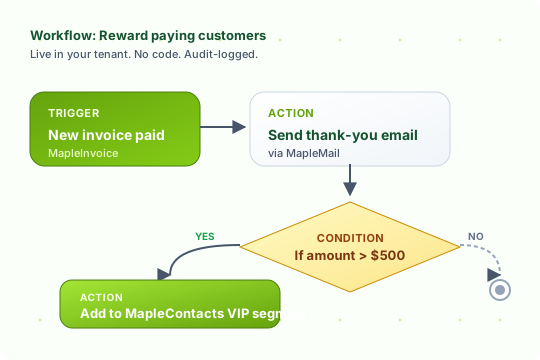
A MapleWorkflow visual editor diagram: a trigger node New invoice paid connects to an action node Send thank-you email via MapleMail, which connects to a conditional If amount > $500, which branches to Add to MapleContacts VIP segment
100+
Triggers & actions
100% CA
Data residency
< 1s
Median step latency
6
Native Maple integrations
Key capabilities

Visual editor, suite-wide triggers and actions

Built into MapleWorkSuite — every product is a first-class trigger or action, no glue code required.

Visual flow editor

Drag triggers and actions onto a canvas. Connect them with arrows. Configure each step with a form — no code.

Triggers across the Maple suite

Fire on new MapleConcierge leads, MapleReceptionist calls, MapleInvoice payments, MapleForms submissions, schedules, or webhooks.

Actions in every app

Send mail via MapleMail, create tasks in MapleTask, tag contacts in MapleContacts, raise invoices in MapleInvoice, or call any HTTP API.

Branching & conditions

If/else, loops, wait steps, and human-in-the-loop approvals — all visible on the canvas so the whole flow reads at a glance.

Audit log on every run

Each execution captures input, output, and timing per step. Failed steps retry with backoff, then land in a reviewable error queue.

Canadian-hosted, CAD billing

Workflows run inside your tenant on Canadian infrastructure. PIPEDA-aligned. Billed in CAD. EN and FR interface.

Use cases

Built for Maple teams

In the wild

See it in action

Connect every Maple product into one Canadian SMB automation.

MapleWorkflow automation nodes and flowcharts shown across multiple monitors in a dimly lit Canadian small business office
How we stack up

MapleWorkflow vs. the usual suspects

Native to your tenant, no auth glue, no foreign data residency, no per-zap surprises.

Feature MapleWorkflow Zapier Make.com n8n self-host
Canadian data residency DIY
PIPEDA aligned DIY
Native Maple-suite steps Pre-auth OAuth each app OAuth each app Manual nodes
Visual canvas editor
Branching & conditions Business+ Pro tier Core tier
Per-run pricing Flat tiers Per-task Per-operation Free + ops
CAD billing USD only EUR/USD n/a
Starts at <strong>$0 CAD</strong> $19.99 USD $9 USD Your time

Maple-suite steps (MapleTask, MapleMail, MapleConcierge, MapleReceptionist, MapleInvoice, MapleContacts) ship pre-authenticated inside your tenant — zero OAuth setup.

Pricing

Pricing (CAD)

Every plan in CAD. Annual prepay available in the billing console.

Free

$0
CAD / month
 
  • 3 active workflows, 100 runs/mo
Choose Free

Pro

$19
CAD / month
 
  • 25 workflows, 10k runs/mo, webhooks
Choose Pro

Enterprise

$149
CAD / month
 
  • Unlimited, SSO, audit export, SLA
Choose Enterprise
In the wild

Operators trust MapleWorkflow

Canadian SMBs are quietly replacing three or four glue tools with one canvas.

We retired our Zapier account on day three. The MapleInvoice → MapleMail → MapleContacts flow took eleven minutes to build and runs every paid invoice.
Nanz Chiasson Operations, Joel & Nanz Inc.
No OAuth dance. No "connect your account" prompts that expire every 90 days. The triggers just work because they live inside the suite.
Ops lead Property management firm, Moncton
The audit log on each run is the killer feature for us — every step shows input, output, timing. Compliance reviews used to take a week.
Finance lead Trades operator, Atlantic Canada
Questions & answers

Frequently asked questions

Common questions about MapleWorkflow. Have something else? Email support@mapleworksuite.com.

What is MapleWorkflow?
MapleWorkflow is a no-code automation engine built into MapleWorkSuite. You design multi-step workflows in a visual editor — pick a trigger (a new lead in MapleConcierge, an invoice paid in MapleInvoice, a Calendly-style booking) and chain actions (send an email via MapleMail, create a task in MapleTask, tag a contact in MapleContacts). No code required.
How does MapleWorkflow compare to n8n, Zapier, Make, and IFTTT?
MapleWorkflow plays the same role as n8n / Zapier / Make.com / IFTTT — visual workflow automation — but with first-class integration into every Maple product. Where Zapier needs API keys, OAuth, and per-zap row limits, MapleWorkflow reaches directly into MapleConcierge agent decisions, MapleDesk ticket fields, and MapleInvoice line items in your tenant. You also get the suite-wide audit log, Canadian data residency, and CAD billing in one bill.
Which Maple products are wired up as triggers and actions?
Triggers: MapleConcierge (new lead, agent escalation), MapleReceptionist (call ended, voicemail), MapleMail (inbound message matched a filter), MapleInvoice (invoice paid / overdue), MapleTask (task created / status changed), MapleContacts (contact created / tag added), MapleCalendar (booking created), MapleForms (submission), and generic webhook. Actions: send email (MapleMail), create task (MapleTask), tag contact / add to segment (MapleContacts), create invoice (MapleInvoice), book event (MapleCalendar), call HTTP endpoint, branch on condition, wait, and human approval.
How steep is the learning curve for the visual editor?
Most users ship their first workflow in under 10 minutes. The canvas is drag-and-drop: drop a trigger node, connect arrows to action nodes, configure each step with a form (no code). Conditional branches and loops are visible on the canvas so you can read the whole flow at a glance. We ship 30+ pre-built templates (New booking to confirmation email + reminder, Paid invoice to thank-you + VIP tag) to start from.
How do I debug a workflow and see logs?
Every run is captured in the Runs tab with full input, output, and timing per step. Click any node to see the data that flowed through it. Failed steps retry with exponential backoff, then land in an error queue with the exception details so you can fix and replay. You can also test run a workflow with sample data before publishing.
Can workflows be triggered by webhooks or the API from external services?
Yes. Every workflow exposes a unique HTTPS webhook URL — POST JSON to it and the workflow fires with that payload available to all steps. You can also call workflows directly from the MapleWorkSuite REST API with your tenant API key, and any workflow step can call out to external REST APIs (Stripe, Slack, HubSpot, your own service).
What does MapleWorkflow cost? Is pricing in CAD?
Yes — all pricing is in Canadian dollars and billed monthly or annually. Free starts at $0 CAD/mo with 3 active workflows. Pro is $19 CAD/mo, Business $49 CAD/mo (most popular), Enterprise $149 CAD/mo. You can switch tiers any time and you only pay for workflow runs above your tier limit.
Where is my data and what about privacy?
Workflows run entirely inside your MapleWorkSuite tenant on Canadian-hosted infrastructure (PIPEDA-aligned). MapleWorkflow does not sell, resell, or broker your workflow data to third parties — there is no external data brokerage. The only outbound traffic is to endpoints you explicitly configure (e.g. a Slack webhook, an SMTP server, a custom API). Audit logs are retained per your tenant retention policy.

Automate the boring half of your business.

Drag triggers, drop actions, ship a flow in minutes. Free tier, paid plans from $19 CAD per month.