Canadian time tracking Β· CAD pricing Β· PIPEDA-hosted

Every hour, tracked, approved, and billed — without a spreadsheet.

MapleTime is a Canadian-hosted time tracking and timesheet platform. Automatic project time capture, weekly approval workflow, billable hours that push straight into MapleInvoice, a live timer tied to MapleTask, and payroll-ready CSV exports. Built for SMB employees, freelancers, and field teams. From $0 CAD/month.

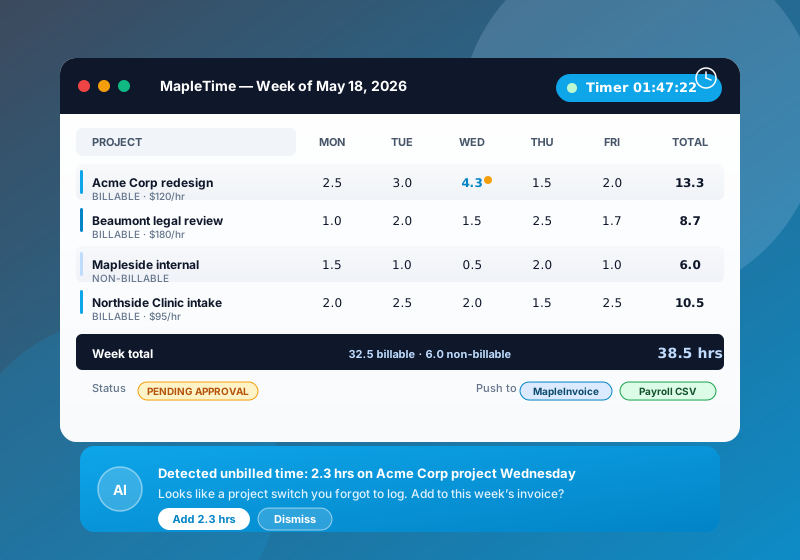
MapleTime weekly timesheet showing five days across four projects with 38.5 total hours, a running timer, and a suggestion detecting 2.3 hours of unbilled time on the Acme Corp project Wednesday
$0
Free solo plan
100% CA
Canadian data residency
CAD
All plans, no FX
38.5 hr
Average week captured
4 apps
Native integrations
What's inside

Everything you need to track, approve, and bill time

Automatic capture, real approvals, billable handoff, and payroll exports. The Canadian SMB time-tracking stack — without four separate tools and a Zapier subscription.

Automatic project time

Run a manual timer, or let MapleTime watch for project switches and prompt you to log the gap. Nothing is recorded without your approval.

Billable vs non-billable

Mark hours billable per project or per entry. Hourly rates, tax, and client codes follow into the invoice so nothing is keyed twice.

MapleInvoice push

One click on the weekly review screen turns approved billable hours into a CAD draft invoice in MapleInvoice — itemized, taxed, ready to send.

MapleTask timer link

Every timer can be tied to a MapleTask task. Stop the timer and time logs to both apps. Roll up by project, client, or task.

Weekly approvals

Friday submit, manager queue, approve or reject with a note. Approved hours unlock the invoice push, payroll export, and budget burn-down.

Payroll-ready CSV

Regular hours, overtime, breaks, project codes. Native exports for ADP Workforce Now, Ceridian Dayforce, Wagepoint, plus a generic CSV.

Native MapleCalendar pull

Meeting blocks from MapleCalendar arrive pre-tagged in your weekly timesheet. One click promotes a meeting to a billable entry.

Manager dashboards

Approval queue, project burn-down, team utilization, and budget vs actuals. Drill from a number into the exact timesheet entries behind it.

Shift scheduling + clock-in

Field teams clock in from mobile, with geo-fence and overtime rules. Breaks auto-deduct. Shift handoff notes attach to the timesheet.

In the wild

See it in action

Time tracking that drops straight into invoices and Canadian payroll.

MapleTime timesheet on a laptop next to a wristwatch and open timesheet notebook in a Canadian small business setting
How we stack up

MapleTime vs. Toggl and Harvest

Canadian-hosted, CAD pricing, with native push into MapleInvoice and Canadian payroll exports.

Feature MapleTime Toggl Track Harvest
Canadian data residency
CAD-native pricing USD USD
PIPEDA aligned
Weekly approval workflow Add-on
Push billable hours to invoicing MapleInvoice 1-click Via Zapier Harvest Invoices
MapleTask timer link
Payroll exports ADP / Ceridian / Wagepoint Generic CSV Generic CSV
Free plan Forever, solo 5 users 1 user / 2 projects
Starts at <strong>$0 CAD</strong> $10 USD / user $11 USD / user

Pricing pulled May 2026. Toggl and Harvest are trademarks of their respective owners.

Plans & pricing

Simple CAD pricing

All plans in Canadian dollars, no FX surprises, switch or cancel from the dashboard at any time.

Free

$0
CAD / user / mo
Solo time tracking, forever free.
  • Unlimited time entries
  • One user
  • Manual timer + browser app
  • Weekly + project totals
  • CSV export
Start free

Pro

$9
CAD / user / mo
For freelancers and sole proprietors.
  • Automatic project detection
  • Billable vs non-billable
  • MapleInvoice push (billable to invoice)
  • MapleTask timer link
  • Mobile apps (iOS + Android)
Choose Pro

Business

$39
CAD / user / mo
For agencies and shift-based field teams.
  • Everything in Team
  • Shift scheduling + clock-in
  • Break + overtime rules
  • SSO + audit log export
  • Priority support
Choose Business
Need shift scheduling, SSO, or a custom payroll export? Business covers most cases — for larger field teams, email support@mapleworksuite.com.
Questions & answers

Frequently asked questions

Common questions about MapleTime. Have something else? Email support@mapleworksuite.com.

What is MapleTime?
MapleTime is a Canadian-hosted time tracking and timesheet platform for SMB employees, freelancers, and field teams. It captures time automatically as you switch between projects, runs a weekly approval workflow for managers, and pushes billable hours straight into MapleInvoice or out as a payroll-ready CSV.
How is MapleTime different from Toggl, Harvest, or Clockify?
MapleTime is built for the Canadian SMB stack: prices are in CAD, data lives in Canada under PIPEDA, and it integrates natively with MapleInvoice (billable hours flow into a CAD invoice in one click) and MapleTask (every timer is tied to a task). Toggl, Harvest, and Clockify are good general tools, but you end up wiring Zapier and re-keying hours into a separate invoicing tool. MapleTime ships those handoffs in the box.
Does MapleTime detect time automatically, or do I have to start a timer?
Both. Run a manual timer (start/stop from the desktop, mobile, or browser app), or let MapleTime watch for project switches and prompt you to log the gap. Assisted detection runs locally and only ever suggests entries; nothing is recorded without your approval. If you forget to log a chunk of time, the AI assistant flags it (e.g. "2.3 hrs of unbilled time on Acme Corp Wednesday — add to invoice?").
How does the MapleInvoice push work (billable hours to invoice)?
Inside MapleTime, mark hours as billable and attach them to a client or project. With one click in the weekly review screen, MapleTime pushes the approved billable hours into MapleInvoice as a draft invoice — itemized by project, with descriptions, hourly rate, and tax pre-filled in CAD. Review, send, and it’s out the door. Hours that have already been pushed are flagged so you never double-bill.
How does the MapleTask link work (timer tied to a task)?
Every time entry can be tied to a MapleTask task. When you click "Start timer" inside MapleTask, MapleTime opens that task in the active timer. When you stop, the duration writes back to both MapleTime (as a billable/non-billable entry) and MapleTask (as work logged against the task). Reporting rolls up by client, project, or task in either app.
What does the weekly approval workflow look like?
On Friday each team member reviews and submits their week from the "My week" screen. Managers see all submitted timesheets in a single approvals queue, can drill into any day, approve, reject with a note, or auto-approve recurring entries. Approved hours unlock the MapleInvoice push, payroll export, and project budget burn-down. Rejected timesheets bounce back to the team member with an audit trail.
Can I export hours to payroll (CSV, ADP, Ceridian, Wagepoint)?
Yes. Once a week is approved, MapleTime produces a payroll-ready CSV with each employee’s regular hours, overtime, breaks, and project codes. We ship native export formats for ADP Workforce Now, Ceridian Dayforce, and Wagepoint, plus a generic CSV that imports cleanly into QuickBooks Payroll and Sage 50 Canadian Edition.
What does MapleTime cost in CAD?
Solo time tracking is free forever. Pro is $9 CAD/user/month for freelancers, Team is $19 CAD/user/month (most popular for SMB teams with approvals and billable handoff), and Business is $39 CAD/user/month for agencies and shift-based field teams. All plans are billed in Canadian dollars, no FX surprises, and you can switch plans or cancel any time from the dashboard.

Ready to retire the timesheet spreadsheet?

Sign up in under 60 seconds. Solo time tracking is free forever &mdash; no credit card required.

Works best with

Companion Maple products

Some features in Mapletime need a companion Maple product to reach customers. Add them anytime from your dashboard.

MapleInvoice Recommended

Enables: Push billable hours to invoice

Learn more →